
Wedding planner weekly client update email template
A wedding planner weekly client update email template should tell the couple what changed, which decisions need their input, and what is due next. Use four short sections: progress, outstanding decisions, upcoming deadlines and reminders. Name the owner and date for each action when you know them; if a vendor hasn't supplied a date or confirmation, leave that detail visibly open.
Download the reusable email kit as a Word document (DOCX) or plain-text file (TXT). Each file includes a blank four-section email and a separately labeled fictional example to reuse in your own editor—not an editable browser draft. No account needed.
Copy this weekly client update email template
Replace every bracket before sending. If a section has nothing new, say so briefly or remove it—don't fill it with reassurance you can't support.
Subject: [Couple names] — wedding update, [date] — [decision needed]
Hi [names],
This week, [specific progress]. We need your input on [decision] by [date]. [One unresolved item, if relevant.]
Progress
- [Vendor or planner] confirmed [specific item] on [date].
- [Work completed by planner]. [Anything still awaiting confirmation].
Outstanding decisions
- [Owner]: please choose [named options or decision] by [date]. [Where to find the options and how to reply].
Upcoming deadlines
- [Date]: [task or decision] — [owner].
- Date not supplied: [open item]. [Owner] to confirm timing.
Reminders
- [Owner]: please [one action] by [date].
I'll [planner's next step]. Your next [routine update/check-in] is [agreed date].
[Planner name]
A deadline belongs in the deadline section so it can be scanned. If you repeat it as a reminder, repeat the same date and action—not a second request hidden in the sentence.
Worked example: two vendor notes become one update
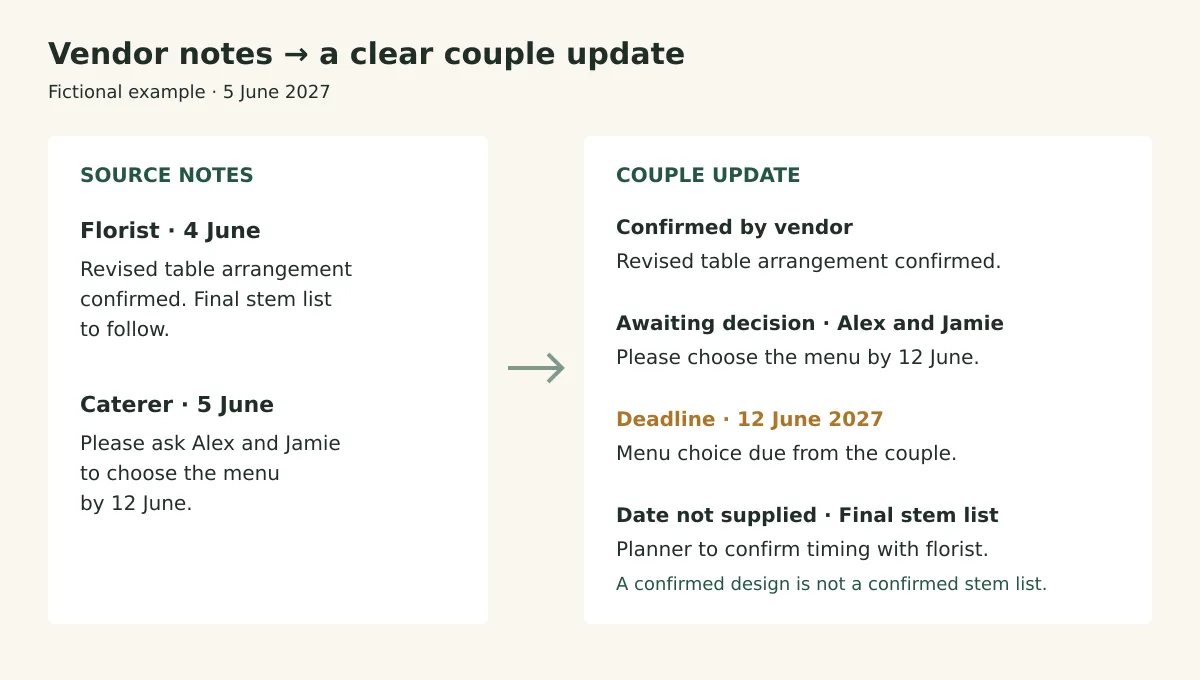
The cover diagram shows how the same two notes become three different statuses. A confirmed arrangement is progress; the menu is a couple decision; the stem list remains an open vendor item.
These names and dates are fictional. The source notes are:
- Florist, 4 June 2027: “Revised table arrangement confirmed. Final stem list to follow.”
- Caterer, 5 June 2027: “Please ask Alex & Jamie to choose the menu by 12 June.”
Before sending, the planner would also need to confirm where the couple can find the menu options. The note supplies a deadline, but not that link or document.
Subject: Alex & Jamie — wedding update, 5 June — menu choice due 12 June
Hi Alex and Jamie,
The florist has confirmed the revised table arrangement. Please choose the menu by 12 June. The final stem list is still outstanding, and the florist hasn't supplied a date for it.
Progress
- The florist confirmed the revised table arrangement in their 4 June note. This confirmation does not include the final stem list.
Outstanding decisions
- Alex and Jamie: please choose the menu by 12 June. [Planner: add the verified menu-options link and reply instructions before sending.]
Upcoming deadlines
- 12 June 2027: menu choice due from Alex and Jamie.
- Date not supplied: final stem list from the florist. I'll ask the florist to confirm timing.
Reminders
- Alex and Jamie: please send me your menu choice by 12 June.
[Planner name]
The bracketed instruction is a preparation check, not couple-facing text. Resolve it before sending. Don't write “flowers finalized” or “stem list arriving next week”: neither statement follows from the florist's note.
To practice wording an open vendor item, compare fictional florist notes with an editable four-section update in Vowtrail. Then choose “Start blank for a real couple” to write, preview and copy your own update without an account.
How do you turn scattered vendor notes into a reliable update?
- Keep the source beside the draft. Record the vendor, note date and exact commitment. Separate “we can offer” from “we have booked.”
- Sort by what the couple needs to know. Completed work goes under progress; a choice they must make goes under decisions; a dated action goes under deadlines.
- Check every action for an owner and date. Ask for missing details. Until they're supplied, use “owner to confirm” or “date not supplied” rather than guessing.
- Read once for unsupported certainty. Check words such as “confirmed,” “final,” “booked” and “paid” against the source. A revised quote is not an accepted booking.
- Read once as the couple. Can they tell what to choose, where to see the options, how to respond and when? Add those details before sharing.
What should you send when nothing is confirmed yet?
A weekly update can report work in progress without calling it completed. Name the unanswered question and your next action; don't turn “no reply” into “everything is on track.”
For example: “The photographer hasn't confirmed the revised arrival time. I'll follow up for confirmation. No action is needed from you on this item.” If you have committed to a follow-up date, include it; otherwise don't invent one for the template.
Keep urgent decisions out of the Friday queue. When a supplied deadline falls before the next routine update, send a separate, focused message through your agreed communication channel. The weekly recap can then record its current status.
See the same structure as a couple report
The fictional sample report shows the florist and caterer example in a report layout, with progress, decisions, deadlines and reminders kept separate. Use it to compare your email draft with a format the couple can scan.